


Sale!


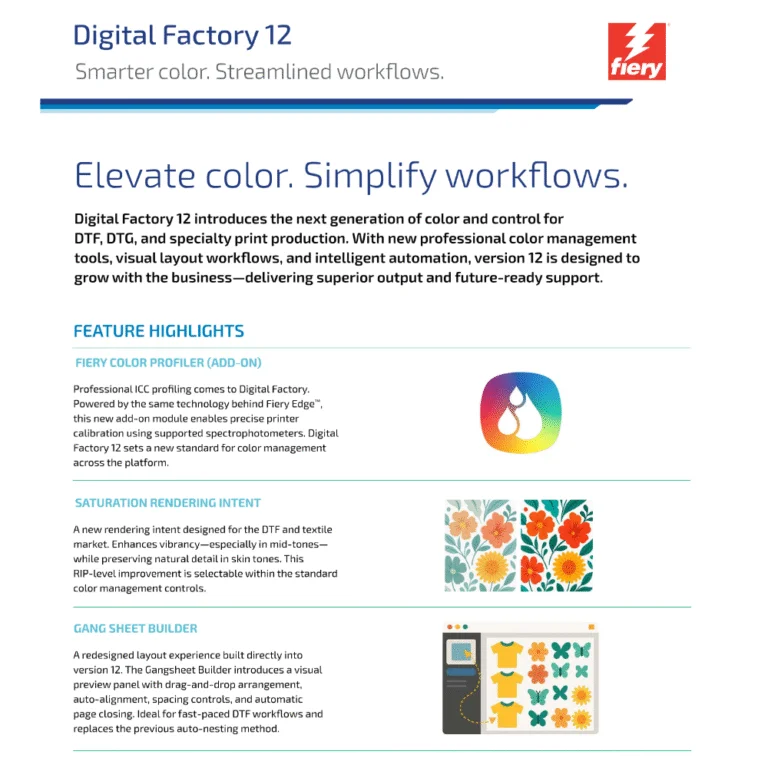
Cadlink Digital Factory V12 Direct to Film RIP Desktop Edition
Original price was: $444.99.$394.99Current price is: $394.99.-
$444.99 Original price was: $444.99.$374.99Current price is: $374.99.
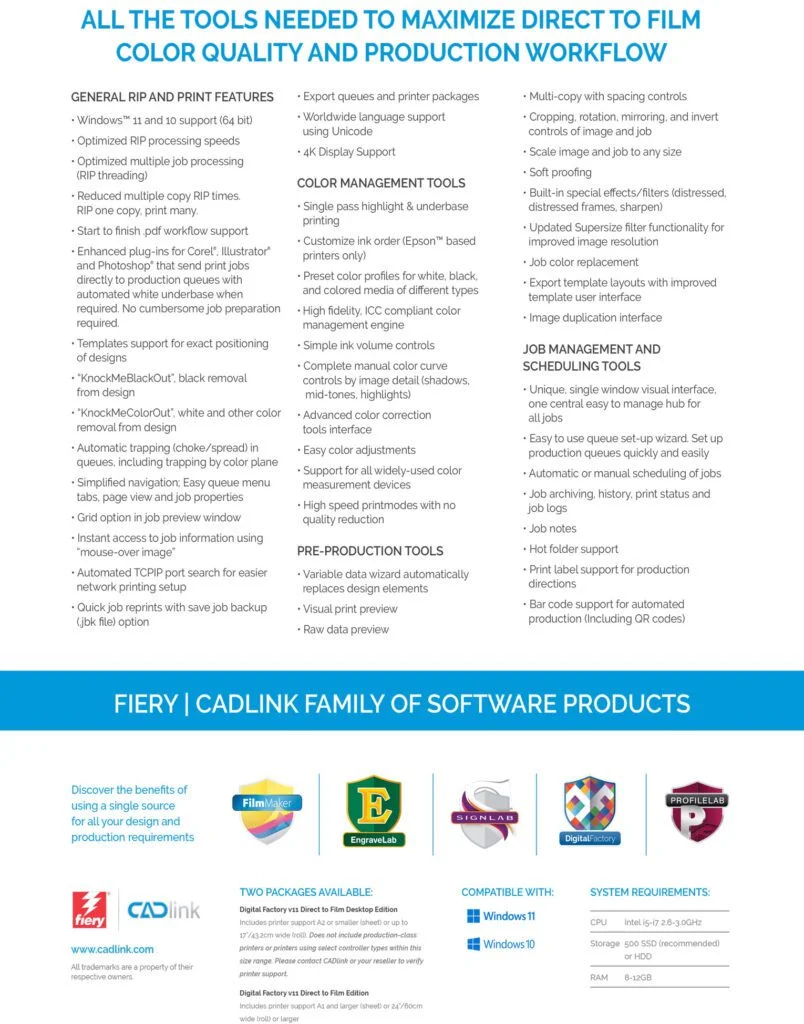
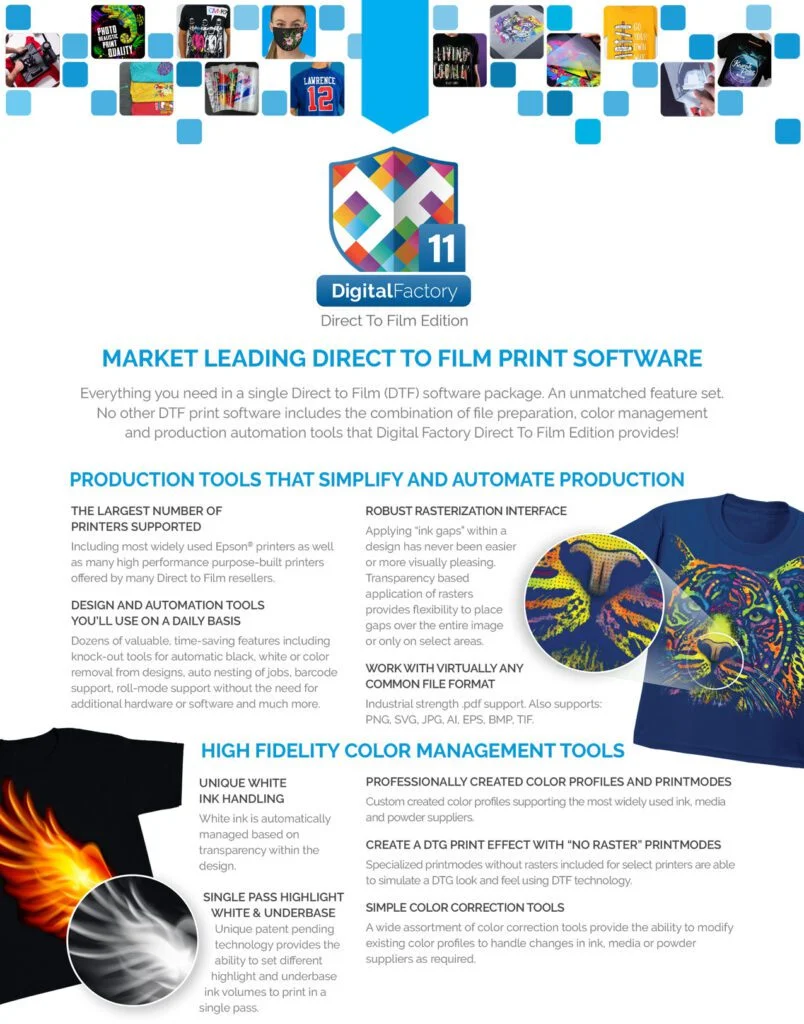
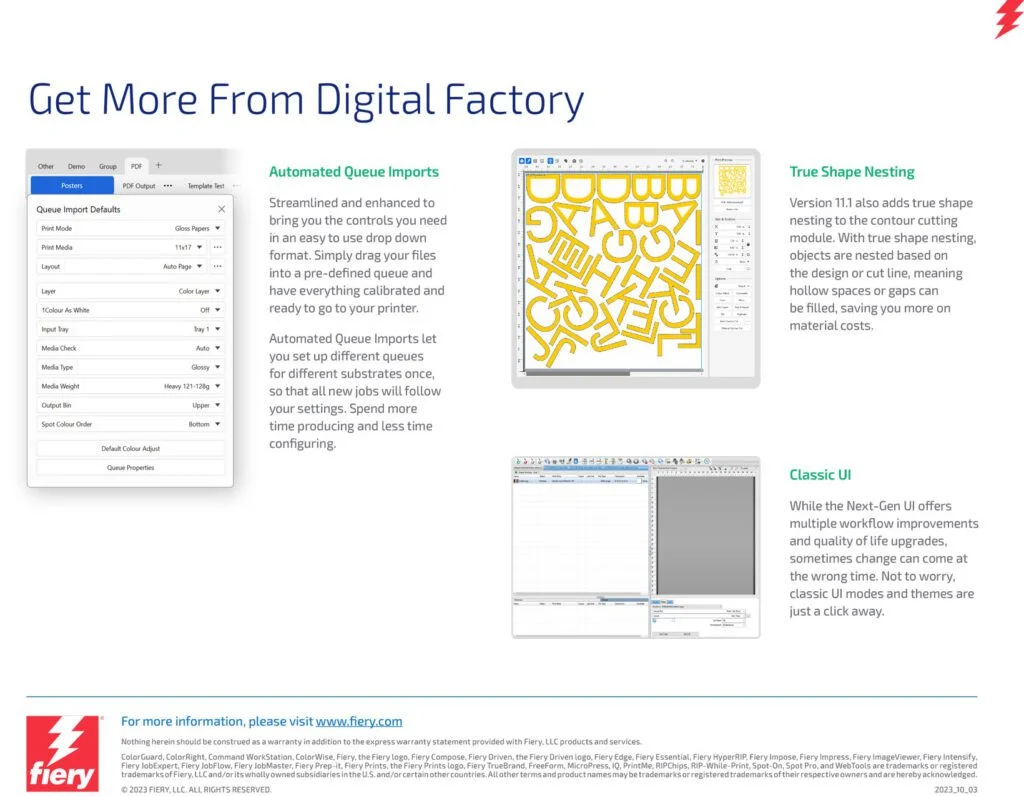
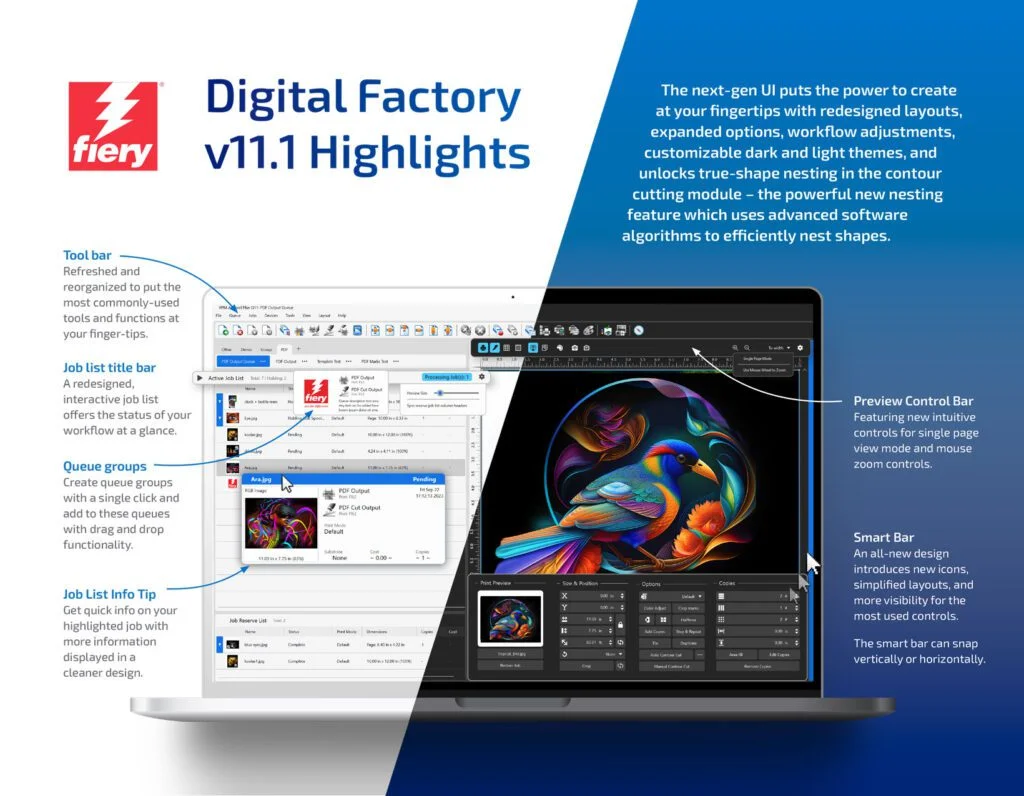
CADlink Digital Factory V11 RIP Software for DTF (Direct to Film) – Desktop EditionDigital Version - Instant Activation Code - No Dongle RequiredKey Features:
CADlink Digital Factory V11 RIP Software for DTF (Direct to Film) – Desktop Edition
Digital Version – Instant Activation Code – No Dongle Required
Key Features:

DTF (Direct-to-Film) printing is a modern textile decoration technology where designs are printed onto a special film, coated with hot-melt adhesive powder, cured, and then heat-pressed onto fabric. It works on nearly all fabric types, delivers vivid colors with strong white ink coverage, and is now a mainstream solution for custom apparel and high-volume production.
DTF RIP software is specialized software that prepares artwork so it can be printed correctly on a DTF printer.
What it does:
In simple terms:
DTF RIP software tells the printer how to print your design correctly on film.
CADlink Digital Factory DTF RIP is often considered one of the best because:
In short, Digital Factory gives better control, consistency, and production reliability than many generic RIPs — especially for DTF workflows.
Cadlink Digital Factory DTF RIP Desktop Edition:
Cadlink Digital Factory DTF RIP Large Format Production Edition:
In short: Desktop = small-scale, single-printer use; Production = large-scale, multi-printer, high-volume workflows.
Yes — you can test Cadlink Digital Factory DTF RIP software before buying. A free 15 day trial version is available from authorized resellers
Trial Availability
Click on Link below to register for Free 15 Day Trial:
https://dtfgears.com/get-free-trial/
If the old computer is not accessible:
Contact CADlink support or DTF Gears and request a license reset.
Please watch the video below for more details:
https://www.youtube.com/shorts/9vfGeakSXV0
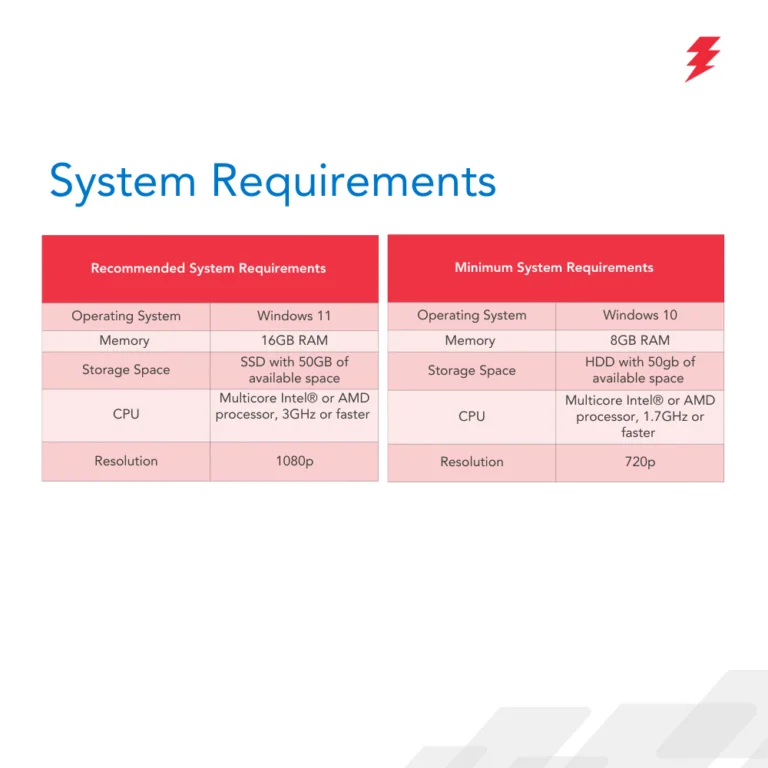
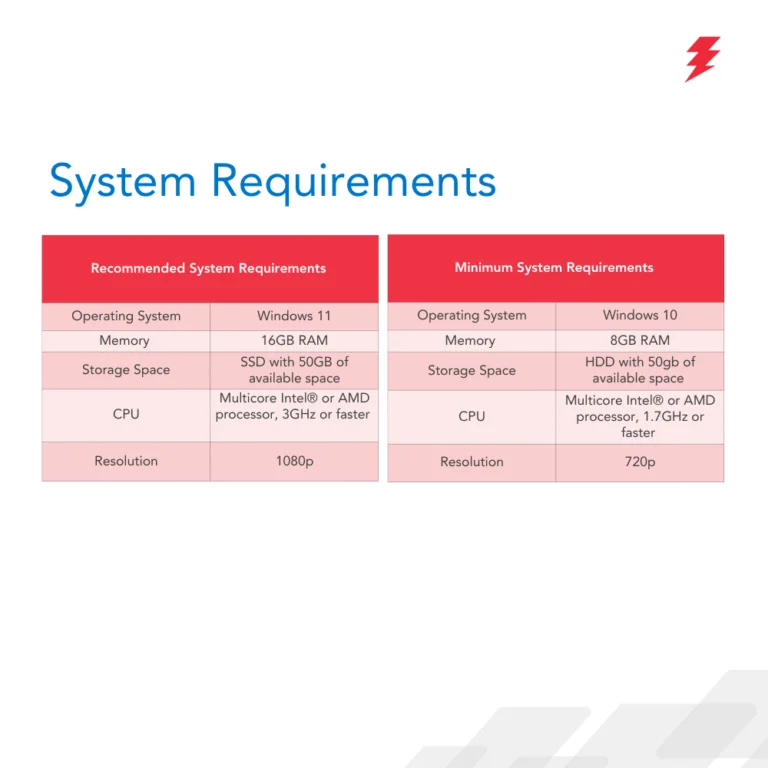
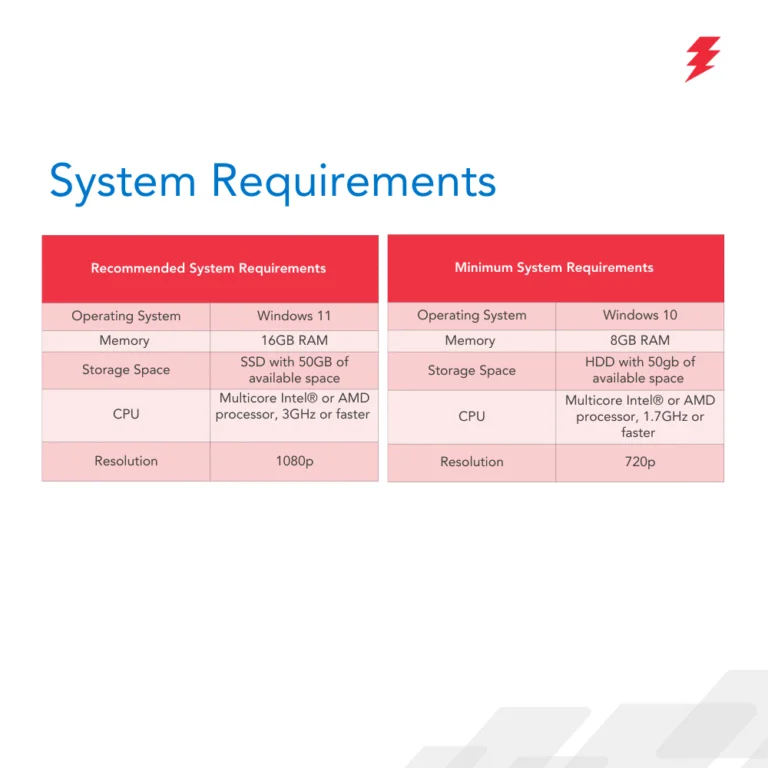
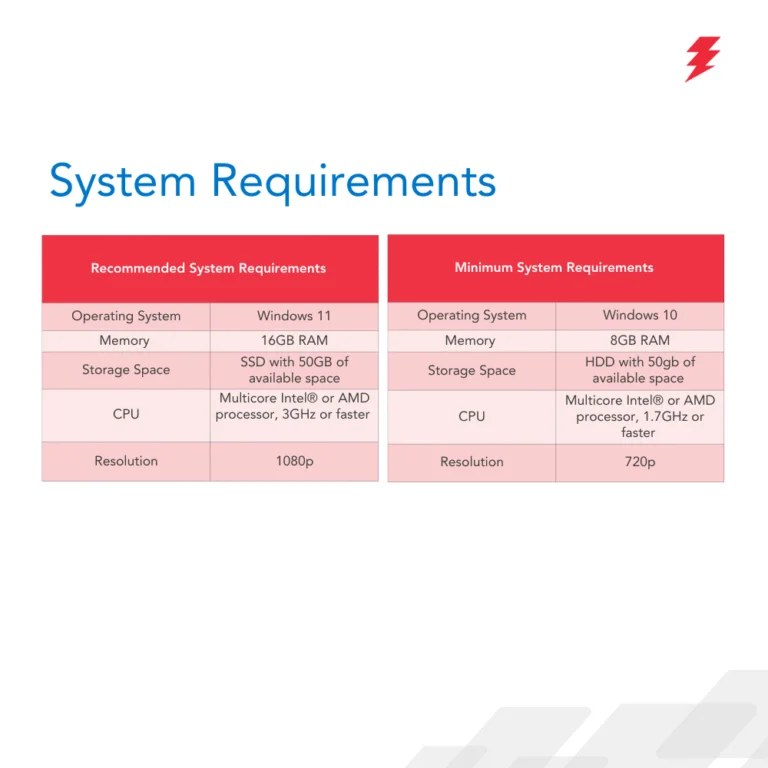
No — CADlink Digital Factory is not natively compatible with macOS. It is designed to run on Windows only (Windows 10/11) and does not have a Mac version.
If you have a Mac
You can only run it by creating a Windows environment using virtualization software (e.g., Parallels Desktop, VMware Fusion), but this is not officially supported on newer Macs with Apple Silicon (M-series) and may not work reliably.
Best approach: use a Windows PC for CADlink to avoid compatibility issues.
Yes — Cadlink Digital Factory does work with many Chinese DTF printers. It supports a wide range of OEM and Chinese brands (e.g., Audley, Sublistar, TitanJet, PIT, AGA-DTF, Oric, etc.), though setup may require proper TCP/IP configuration and ensuring the RIP software runs on the same computer as the printer’s control software
For Details check the article Below:
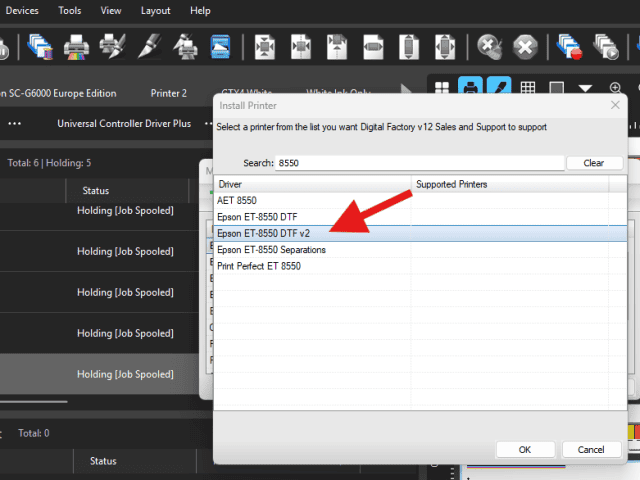
Make sure that you install the v2 driver for the 8550. The v2 will allow changing ink orders. Go to Devices – Manage Devices. Then install printer and type in 8550. This should give you the v2 driver here:
Open the CADlink software and navigate to Queue > Properties. In the left pane, expand Color Layer, then select Processing Options. From here, you can adjust and increase the Underbase settings.
If CADlink asks to save the file instead of printing, it means no valid printer is selected.
Steps to fix:
1. Go to File → Print and select your actual printer queue (not “Print to File”).
2. Open Queue → Properties and confirm the correct printer model and connection.
3. Make sure the printer is online in Windows.
4. If it still happens, delete and re-add the printer queue in CADlink.
5. Restart CADlink (and the PC if needed).
Tip: Re-adding the printer queue fixes this in most cases.
Role of Halftones in V12
Where to Find Settings
Options
When to Adjust
-
-
-
-
-
-
-
-
-
-

Dana –
The purchase was extremely fast. The support team answers immediately to all questions and are so helpful, solving all issues appeared.
The application works proper without any issues. Easy software & many information is available online.
Highly recommend for those who is looking for a software for DTF printing.

Alicia Tutt –
Justin Walter was awesome. He called at the right moment when I needed help. He assisted me with resetting my cadlink license so that I could get back into my software. As a small business owner, its important for me to complete orders in a timely fashion. Thanks for your assistance.

Jacqueline Stackhouse –
Justin has been a great help and I love that he is very patient with me as well. Great customer service

Mary Powell –
Thank for all your help. I just wish we could make it work. Waiting for new printer to come. And when it comes in i will text or call and ask for help.

Mario –
Excellent product and customer service

Kenya Kustom Kreations –
Someone from a FB group I’m in suggested that I tryout this company spoke very highly of them. This was a great addition to my business cadlink upgrade to multiple printers. Easy to use Justin to check if I received a email that’s sent to me. Thx

Tiffany calligan –
Justin Walter was great, patient, knowledgeable, and very polite. If you’re stuck on anything, Justin is your guy. Big shout out to Justin again, thank you!

John RIley –
Justin came through in the clutch and got my software back up and running amazing.

Jacinthe –
I write to this website for some information! I am canadian french and my english are not well. Justin write to me for the information that i’ved need and at this time he help me again. I very appreciate his service and help. I give Justin and this website 100% and their prices are very competitive! I love all of this!

Cozette –
Justin helped me so much with my new software. I am not computer literate and he was able to talk me through the very easy process of set up, he sent emails with instructions and he did follow up calls. Talk about great customer service! I am now Cadlink and Justins biggest fan.
Thank you so much.
We use cookies to improve your experience on our site. By using our site, you consent to cookies.
Websites store cookies to enhance functionality and personalise your experience. You can manage your preferences, but blocking some cookies may impact site performance and services.
Essential cookies enable basic functions and are necessary for the proper function of the website.
These cookies are needed for adding comments on this website.
Google Tag Manager simplifies the management of marketing tags on your website without code changes.
Statistics cookies collect information anonymously. This information helps us understand how visitors use our website.
Google Analytics is a powerful tool that tracks and analyzes website traffic for informed marketing decisions.
Service URL: policies.google.com (opens in a new window)
SourceBuster is used by WooCommerce for order attribution based on user source.



Dana –
The purchase was extremely fast. The support team answers immediately to all questions and are so helpful, solving all issues appeared.
The application works proper without any issues. Easy software & many information is available online.
Highly recommend for those who is looking for a software for DTF printing.
Alicia Tutt –
Justin Walter was awesome. He called at the right moment when I needed help. He assisted me with resetting my cadlink license so that I could get back into my software. As a small business owner, its important for me to complete orders in a timely fashion. Thanks for your assistance.
Jacqueline Stackhouse –
Justin has been a great help and I love that he is very patient with me as well. Great customer service
Mary Powell –
Thank for all your help. I just wish we could make it work. Waiting for new printer to come. And when it comes in i will text or call and ask for help.
Mario –
Excellent product and customer service
Kenya Kustom Kreations –
Someone from a FB group I’m in suggested that I tryout this company spoke very highly of them. This was a great addition to my business cadlink upgrade to multiple printers. Easy to use Justin to check if I received a email that’s sent to me. Thx
Tiffany calligan –
Justin Walter was great, patient, knowledgeable, and very polite. If you’re stuck on anything, Justin is your guy. Big shout out to Justin again, thank you!
John RIley –
Justin came through in the clutch and got my software back up and running amazing.
Jacinthe –
I write to this website for some information! I am canadian french and my english are not well. Justin write to me for the information that i’ved need and at this time he help me again. I very appreciate his service and help. I give Justin and this website 100% and their prices are very competitive! I love all of this!
Cozette –
Justin helped me so much with my new software. I am not computer literate and he was able to talk me through the very easy process of set up, he sent emails with instructions and he did follow up calls. Talk about great customer service! I am now Cadlink and Justins biggest fan.
Thank you so much.