


eufyMake E1 Basic Bundle
The compact all-rounder. 1440 DPI, 5 mm texture and ink included, on a desk-friendly 44 lb frame.
- A3, 13" × 16.5"
- Up to 5 mm texture
- 44 lb
$2,499$2,899
Save $400
Updated September 2026
Two desktop UV printers sit right under the $2,500 line, and both print A3 on wood, acrylic, metal, glass and more. The real difference is how much texture you need, how much space you have and which computer you run. Here's how to pick the right one in a couple of minutes.
Free shippingOrders over $299
Same-day dispatchBefore 12pm PST
Authorized distributorFull warranty
FinancingAffirm and Clicklease
Remote setupWith our technician
For most buyers it's the eufyMake E1 Basic Bundle at $2,499 (regularly $2,899). It prints up to 1440 DPI on 300+ materials, adds raised texture up to 5 mm, and at about 44 lb it fits on an ordinary desk. If your products depend on deep texture or exact placement, the xTool O1 Omni Single UV Starter Bundle at $2,499 is the step up: 7 mm texture, Pixel-Scan positioning to about ±0.2 mm, and macOS support.
Prices shown are live from our store. Specs are from the manufacturers' published listings.
Short on time? Here are both printers, side by side. Full reviews are further down.
The compact all-rounder. 1440 DPI, 5 mm texture and ink included, on a desk-friendly 44 lb frame.

The precision pick. 7 mm raised texture, Pixel-Scan placement to ±0.2 mm and an Epson F1080 head.
Same price bracket, different strengths. The highlighted cell shows which printer has the edge on each line.
| Spec |
 eufyMake E1
Edge on 5 lines eufyMake E1
Edge on 5 lines
|
 xTool O1 Omni
Edge on 6 lines xTool O1 Omni
Edge on 6 lines
|
|---|---|---|
| Bundle price | $2,499was $2,899 | $2,499 |
| Max print area | A3, 13" × 16.5" | A3+, 13" × 16.5" |
| Printhead | Piezo inkjet | Epson F1080 |
| Max resolution | Up to 1440 DPI | Up to 720 × 1440 dpi |
| Inks | CMYK + White + Gloss | CMYK + White + 3-in-1 varnish gloss, matte, raised |
| Raised texture | Up to 5 mm | Up to 7 mm |
| Positioning | Dual lasers + built-in camera | Pixel-Scan vision ±0.2 mm accuracy |
| Auto maintenance | JetClean deep clean every 72 h | Smart Cycle 2.0 white ink stirring + circulation |
| Computer | Studio for PC + mobile app | Windows and macOS + mobile app |
| Weight | About 44 lb | 89.5 lb |
| Footprint | 590 × 250 × 407 mm | 714 × 374 × 469 mm |
| Long runs | Roll-to-film add-on up to 10 m | Not listed |
| Materials | 300+ surfaces incl. fabric with flexible white | Rigid and specialty materials |
| Rotary / UV DTF | Optional add-ons | Optional add-ons |
| Warranty | 1 yr main parts, 3 mo printhead | 12 months |
| Buy | Read review | Read review |
Price edge updates automatically. All other specs are from the manufacturers' listings.
Drag the slider to build up raised UV texture, shown to scale next to a stack of US quarters (1.75 mm each).
Both printers can print this
Embossed logos and raised lettering you can feel
Four quick questions about what you print and where you work. We'll point you to the printer that fits.
Question 1 of 4
Question 2 of 4
Question 3 of 4
Question 4 of 4
Your match
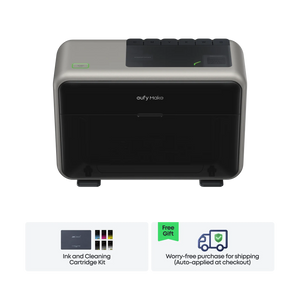
You want a versatile, compact UV printer that covers the widest range of materials without taking over the room.
$2,499
Your match
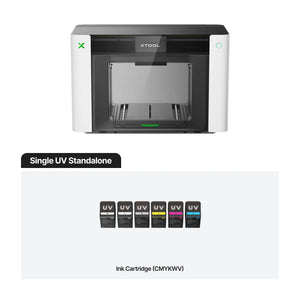
Your products lean on deep texture and precise placement, and the O1 Omni is built for exactly that.
$2,499
What each bundle does well, where it falls short, and exactly what arrives in the box.

The E1 is the easiest way into UV printing at this price. It prints CMYK, white and gloss at up to 1440 DPI on 300+ materials, from wood and acrylic to metal, glass, leather and even fabric with flexible white, and builds raised texture up to 5 mm. Dual lasers and a camera handle alignment, and JetClean runs maintenance in the background so white ink stays healthy. At about 44 lb and 66 W max, it sits comfortably in a spare room.
Best for: Etsy and Shopify sellers, trophy and award shops, signage, first UV printer

The O1 Omni is the one to pick when texture is the product. It stacks raised UV up to 7 mm, and its 3-in-1 varnish adds gloss, matte and dimensional effects on top of CMYK and white. Pixel-Scan vision reads what is on the bed and places artwork to about ±0.2 mm, which pays off on phone cases, awards and odd-shaped blanks. Smart Cycle 2.0 stirs and circulates white ink automatically. It is a bigger machine at 89.5 lb, so plan a sturdy bench and ventilation.
Best for: Personalization shops, awards and plaques, phone cases, premium textured products
Accessories and supplies that expand what you can print. Add them now so everything ships together.


Plug in your own numbers. Everything below is calculated from what you enter.
An estimate based only on your inputs. It doesn't include shipping, fees, labour or taxes.
Six things decide whether a UV printer earns its keep in your business.
Both printers take items up to 13" × 16.5". That fits a tray of keychains, a phone case batch or a single sign. Bigger panels need a larger-format machine.
Raised texture is built from stacked white ink and varnish. Up to 5 mm covers embossed logos and spot gloss. Up to 7 mm gives you deep, sculpted relief. See it to scale.
Camera and laser alignment saves wasted blanks. If you print on pre-made items like cases and awards, tighter placement accuracy pays for itself fast.
White ink settles if it sits. Both machines stir, circulate and clean automatically, so leave them powered on during regular use and let the maintenance run.
UV printing gives off odor, so plan airflow. Check your bench can carry the weight: about 44 lb for the E1 and 89.5 lb for the O1 Omni.
Budget for ink, cleaning cartridges and pre-coat for glass, metal and acrylic. Keep spares on hand so a job never stalls. Shop UV supplies.
Can't find your answer? Call (+1) 877-576-8415 or email sales@dtfgears.com.
For most businesses, the eufyMake E1 Basic Bundle. It covers 300+ materials at up to 1440 DPI with 5 mm texture in a compact 44 lb frame. Choose the xTool O1 Omni Single UV if you need 7 mm texture, ±0.2 mm placement or macOS support.
Pick the E1 for versatility, a smaller footprint and long runs with the roll-to-film add-on. Pick the O1 Omni when deep texture and exact placement on finished products are what your customers pay for.
Yes, with a rotary attachment. It's an optional add-on for both printers and lets you print on tumblers, mugs, bottles and other cylindrical items. The E1 Deluxe Bundle includes it.
Yes. Both work in a UV DTF workflow with UV DTF film and a laminator, which is sold separately or included in the E1 Deluxe Bundle. The transfers stick to curved and irregular hard surfaces.
UV printers are made for hard goods. The E1 can print on some fabrics with flexible white, but for t-shirts and apparel a DTF printer is the better tool. See our best DTF printer under $2,500 guide.
The xTool O1 Omni supports Windows and macOS. eufyMake lists Studio software for PC plus a mobile app for the E1. If you're on a Mac, call us before ordering and we'll walk you through the options.
Yes. Affirm and Clicklease are available at checkout, subject to approval. See our financing page for details.
Orders placed before 12pm PST ship the same day. Shipping is free on orders over $299 within the continental US by standard ground.
Tell us what you want to print and we'll tell you honestly which printer fits, what supplies you'll need, and how setup works. Our technician helps you get running remotely.