

Sale!

Digital Factory V12 Direct to Film RIP Desktop Edition
Original price was: $444.99.$394.99Current price is: $394.99.-
$495.00
Build your own file-sorting rules and let AJS handle them automatically. Boost efficiency and eliminate manual job management.The Automatic Job Sorter (AJS) Module brings intelligent file automation to Digital Factory, allowing you to set custom rules based on file names, folders, and job attributes. Once configured, AJS automatically imports, organizes, and routes jobs to the appropriate printer or queue—removing manual sorting and increasing efficiency in high-volume production.
Build your own file-sorting rules and let AJS handle them automatically. Boost efficiency and eliminate manual job management.
The Automatic Job Sorter (AJS) Module brings intelligent file automation to Digital Factory, allowing you to set custom rules based on file names, folders, and job attributes. Once
configured, AJS automatically imports, organizes, and routes jobs to the appropriate printer or queue—removing manual sorting and increasing efficiency in high-volume production.

DTF (Direct-to-Film) printing is a modern textile decoration technology where designs are printed onto a special film, coated with hot-melt adhesive powder, cured, and then heat-pressed onto fabric. It works on nearly all fabric types, delivers vivid colors with strong white ink coverage, and is now a mainstream solution for custom apparel and high-volume production.
DTF RIP software is specialized software that prepares artwork so it can be printed correctly on a DTF printer.
What it does:
In simple terms:
DTF RIP software tells the printer how to print your design correctly on film.
CADlink Digital Factory DTF RIP is often considered one of the best because:
In short, Digital Factory gives better control, consistency, and production reliability than many generic RIPs — especially for DTF workflows.
Cadlink Digital Factory DTF RIP Desktop Edition:
Cadlink Digital Factory DTF RIP Large Format Production Edition:
In short: Desktop = small-scale, single-printer use; Production = large-scale, multi-printer, high-volume workflows.
Yes — you can test Cadlink Digital Factory DTF RIP software before buying. A free 15 day trial version is available from authorized resellers
Trial Availability
Click on Link below to register for Free 15 Day Trial:
https://dtfgears.com/get-free-trial/
If the old computer is not accessible:
Contact CADlink support or DTF Gears and request a license reset.
Please watch the video below for more details:
https://www.youtube.com/shorts/9vfGeakSXV0
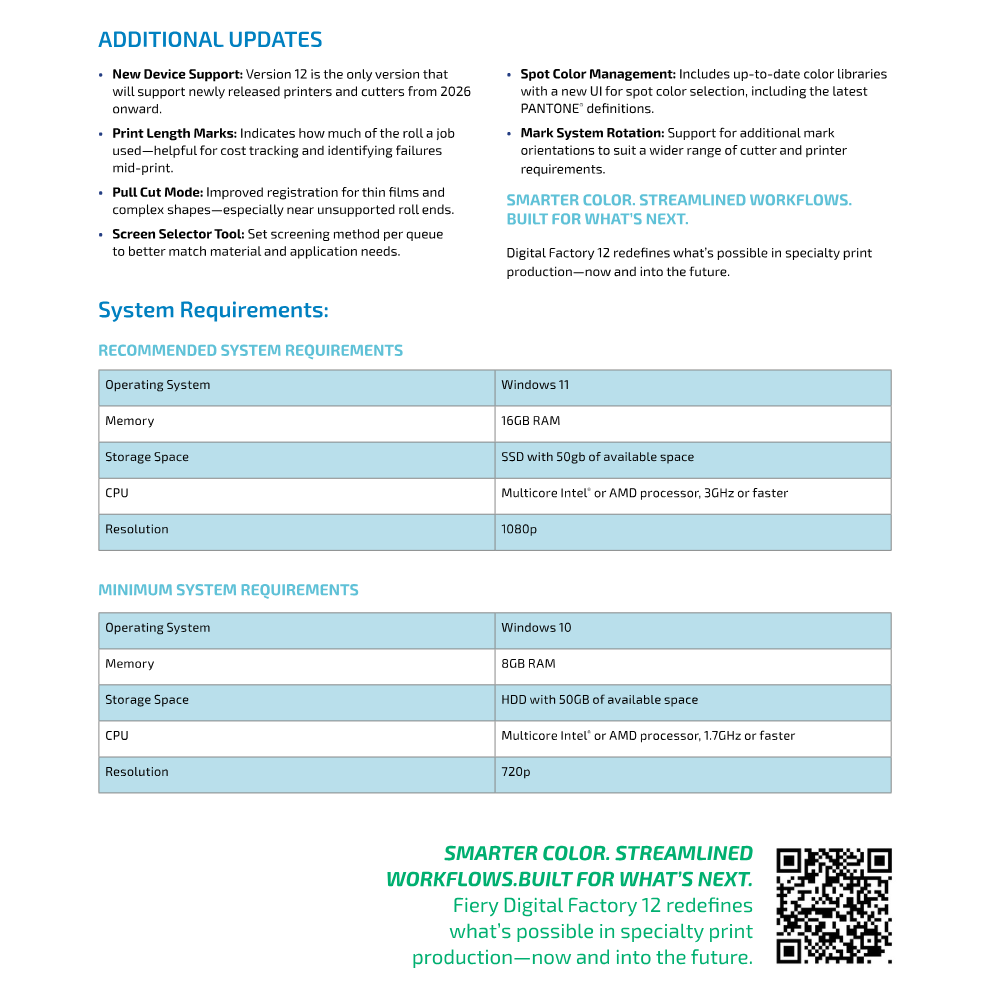
No — CADlink Digital Factory is not natively compatible with macOS. It is designed to run on Windows only (Windows 10/11) and does not have a Mac version.
If you have a Mac
You can only run it by creating a Windows environment using virtualization software (e.g., Parallels Desktop, VMware Fusion), but this is not officially supported on newer Macs with Apple Silicon (M-series) and may not work reliably.
Best approach: use a Windows PC for CADlink to avoid compatibility issues.
Yes — Cadlink Digital Factory does work with many Chinese DTF printers. It supports a wide range of OEM and Chinese brands (e.g., Audley, Sublistar, TitanJet, PIT, AGA-DTF, Oric, etc.), though setup may require proper TCP/IP configuration and ensuring the RIP software runs on the same computer as the printer’s control software
For Details check the article Below:
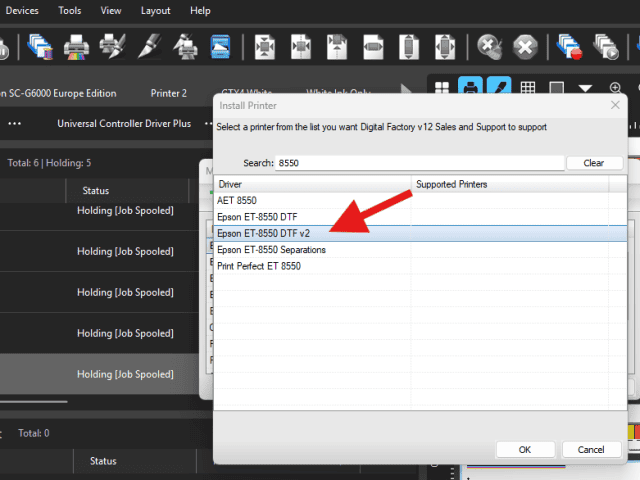
Make sure that you install the v2 driver for the 8550. The v2 will allow changing ink orders. Go to Devices – Manage Devices. Then install printer and type in 8550. This should give you the v2 driver here:
Open the CADlink software and navigate to Queue > Properties. In the left pane, expand Color Layer, then select Processing Options. From here, you can adjust and increase the Underbase settings.
If CADlink asks to save the file instead of printing, it means no valid printer is selected.
Steps to fix:
1. Go to File → Print and select your actual printer queue (not “Print to File”).
2. Open Queue → Properties and confirm the correct printer model and connection.
3. Make sure the printer is online in Windows.
4. If it still happens, delete and re-add the printer queue in CADlink.
5. Restart CADlink (and the PC if needed).
Tip: Re-adding the printer queue fixes this in most cases.
Role of Halftones in V12
Where to Find Settings
Options
When to Adjust
DTF stands for Direct-to-Film — it’s a printing method where designs are printed onto a special film, coated with adhesive powder, and then heat-transferred onto fabric. It’s a popular alternative to DTG (Direct-to-Garment) printing, especially for vibrant, durable prints on a wide variety of materials.
DTF software stands for Direct-to-Film printing software, and it’s a specialized type of RIP (Raster Image Processor) software designed specifically for the DTF printing process. It prepares digital artwork for optimal printing on a special film, which is later transferred onto fabric (usually cotton or polyester) using heat and adhesive powder.
A RIP software converts vector and raster images (like PDFs, PNGs, or AI files) into a format that a printer can understand — essentially “translating” digital design files into precise instructions for ink placement, color management, and print quality.
CADlink Technology, now operating as Fiery LLC (CADlink), is a Canadian software company based in Ottawa, Ontario. CADlink specializes in developing design and production software solutions tailored for various industries.
Yes, you absolutely can test DTF software for free—most major DTF RIP software providers offer a trial version so you can try it out before purchasing. We also offer Free 15-day trial.
-
-
-
-
-
-
-
-
-
-
-
-
There are no reviews yet.
We use cookies to improve your experience on our site. By using our site, you consent to cookies.
Websites store cookies to enhance functionality and personalise your experience. You can manage your preferences, but blocking some cookies may impact site performance and services.
Essential cookies enable basic functions and are necessary for the proper function of the website.
These cookies are needed for adding comments on this website.
Google Tag Manager simplifies the management of marketing tags on your website without code changes.
Statistics cookies collect information anonymously. This information helps us understand how visitors use our website.
Google Analytics is a powerful tool that tracks and analyzes website traffic for informed marketing decisions.
Service URL: policies.google.com (opens in a new window)
SourceBuster is used by WooCommerce for order attribution based on user source.
Reviews
There are no reviews yet.